To track your flight in real time, type your flight number into your airline’s app and into a live map such as Flightradar24 or FlightAware, then switch on push notifications for that flight. The airline gives you the gate and boarding details; the live map follows the aircraft itself, so it often shows a delay, an aircraft swap or a cancellation before the airline’s own app does. Setting both up takes about two minutes, and you can do it from the couch the night before or at the gate the morning of.
I travel with a tracker open more often than I travel with a boarding pass. The reason is simple: an airline app tells you what the airline plans, while a live map tells you where the plane physically is. Those two things drift apart all afternoon, and the gap is exactly the part where you can still change something.
Here is the setup that has never let me down, plus the reading guide that stops the numbers from confusing you.
Table of Contents
- 1What You Need Before You Start
- 2Step-by-Step: How to Track Your Flight in Real Time
- 3How to Read Flight Status Updates
- 4Check the Airport for Gate and Delay Information
- 5Use a Second Tracker When Needed
- 6Common Tracking Mistakes and the Fix for Each
- 7Frequently Asked Questions
- 8What are some real-time flight tracking services available?
- 9Is flight tracking legal?
- 10How can I check the status of my flight?
- 11Can I track a flight using my phone?
- 12Can you track a flight without knowing the flight number?
- 13Do flight tracker apps work for connecting flights?
What You Need Before You Start
Six things, and you already have most of them. Gather them in one place so you are not digging through email while the phone rings.
- Your booking reference (PNR) — usually six letters and digits, found in the confirmation email or at the top of the itinerary.
- Your airline’s app or website — the official source for gate, check-in and boarding status.
- The departure airport — the three-letter code, such as MAD or JFK, which unlocks the airport’s own departure board.
- Your destination, useful when you have several flights with similar numbers on the same day.
- The flight date, in local time at the departure airport. This matters more than people expect; the detail is covered under common mistakes.
- A second tracker — a different live map, plus the airport’s own site, so a single frozen icon never has the last word.
That is the whole kit. Nothing here needs a subscription to be useful, and nothing needs to be installed before you leave home.
Step-by-Step: How to Track Your Flight in Real Time
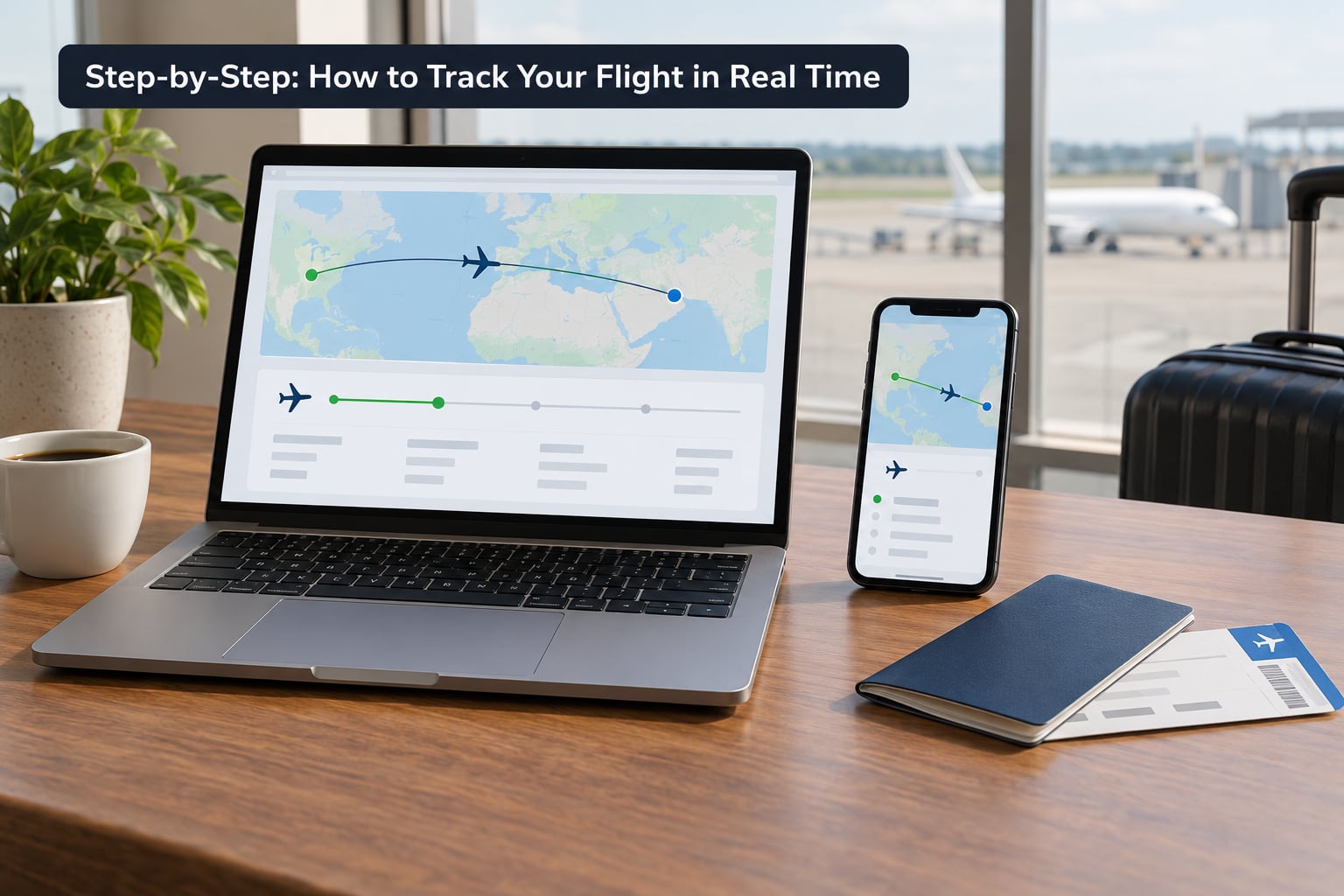
Work through these steps in order the first time. After that, step 3 is the one you repeat.
- Confirm the exact flight number. Two letters and one to four digits, such as LH401 or BA248. On a codeshare ticket your own number may differ from the operating carrier’s, so search both numbers until one returns a live aircraft rather than a bare schedule line.
- Open the airline’s “My trips” or manage-booking page and add the trip. Enter the booking reference and the last name on the ticket. This is where gate, check-in, boarding group and any operational message live, and it is the record the airline will update if something changes.
- Enter the same flight number in a live map. Flightradar24 and FlightAware both let you search by number, and both show position, altitude, ground speed, aircraft type and registration. If the map shows a plane with a track behind it, you have the right flight.
- Turn on alerts and set the lead time. Enable notifications for that specific flight, then choose an advance-warning setting if the app offers one. A ten-minute warning is useless if you are already in a boarding queue; thirty minutes is enough to call someone or open a new booking.
- Check the inbound aircraft one to two hours before departure. Search the same route and look at what is flying in. If the inbound leg is late, arriving aircraft, or has swapped planes, your departure will usually slip with it.
- Note the aircraft type and registration once, then check again later. A last-minute equipment change matters more than most people realise: the same flight number can go out on a smaller aircraft on a tight route, which changes your baggage allowance and sometimes your seat pitch. Live maps show the type and registration currently assigned, so you can see a swap when it happens.
- Send a live link to whoever is waiting. Every major tracker produces a shareable page that updates itself. Your partner or pickup driver then sees your actual position instead of your stale text messages.
Steps 1 through 4 are the core routine you repeat every trip. Steps 5 to 7 are what turn a tracker into something you can actually act on.
How to Read Flight Status Updates
A status line is short on purpose, and each word means a specific thing.
- Scheduled — the published plan. No aircraft is assigned yet, so treat the time as a placeholder.
- On time — the airline is tracking the plan within its own tolerances.
- Delayed — usually shown with two times: the original scheduled one and the new estimated one. The estimated time is a prediction, and predictions move.
- Boarding — the gate is open and agents are calling groups.
- Departed — airborne, with the live map now showing climb, route and estimated arrival.
- Diverted — the aircraft landed somewhere other than the destination. The airline, not the map, tells you what happens next.
- Landed — arrived; the arrival time can differ from the estimate by a few minutes.
- Cancelled — no flight today. Rebooking starts with the airline, not the tracker.
Times change for reasons you cannot see from the ground: an inbound aircraft arriving late, a crew reaching a duty limit, air traffic control ground stops, weather, or an airport curfew at the far end. What matters is which detail you read at each stage. Before you leave home, watch the estimated departure. At the airport, watch the gate. Once you are airborne, watch the position and the estimated arrival.
Check the Airport for Gate and Delay Information
The departure airport’s own website or app answers the questions the airline app answers slowly. Open it, find the departures board for your terminal and search by flight number. You get terminal, gate, check-in counters and, on many airports, the current security queue estimate.
Gate information often appears only one to three hours before departure, and sometimes not online until close to the boarding time. If the field is blank, check the board inside the terminal, look at the departure screens near security, or ask an agent. An unpublished gate is normal behaviour, not a sign that your booking went wrong.
The airport site is also the fastest way to see the wider picture on a bad day. When weather is causing mass cancellations, the board shows every affected flight at once, which the airline app will not.
Use a Second Tracker When Needed
Two trackers showing different delay minutes is normal, and it has two causes. The first is data source: one may be reading the airline’s own feed while the other is inferring the schedule from the aircraft’s position. The second is coverage. Aircraft broadcast their position automatically, and ground receivers plus radar pick that up, but over open ocean and remote polar routes there are far fewer receivers, so updates arrive in long gaps.
When that happens the aircraft icon sits still or draws a straight line between points. It does not mean tracking failed. It means no fresh signal has arrived yet, and the app is showing your last known position.
So use the second source for specific jobs. Two live maps help when you have a tight connection and want to know which aircraft is physically closer to your gate. The airline app wins on gate changes and rebooking. The airport board wins on cancellations and terminal layout. Nobody wins alone, which is why I keep two tabs open.
Common Tracking Mistakes and the Fix for Each
- Searching the wrong date. Confirmation emails show local time, and a red-eye trip crosses midnight twice. Use the departure date shown on your itinerary, not the date you expect to land. Fix: search by flight number first, which ignores the date field entirely.
- Searching the wrong flight number on a codeshare. The number on your ticket may be a marketing number with no aircraft attached. Fix: search the operating carrier’s number too and compare the two.
- Leaving the browser tab open since yesterday. A page you loaded hours ago shows the hour you loaded it. Fix: pull to refresh, or switch to the app, which updates in the background.
- Treating the gate as final. Gates get reassigned when an aircraft arrives late or a stand is blocked. Fix: re-check the airline app once you are through security and again at the gate.
- Reading an estimated time as an actual one. Estimated departure is a forecast and it slides. Fix: treat any estimate more than an hour out as provisional and check again before you commit to a plan.
- Assuming a frozen aircraft means something broke. Coverage gaps cause it. Fix: check the last update time, then confirm with the airline.
- Never turning notifications on. A tracker you have to open is a tracker that is late. Fix: enable alerts for each leg of the trip the night before, and allow notifications for the app in your phone settings.
One more habit worth building: add every leg of the trip, not just the first. Connections are where tracking pays for itself, because the inbound flight’s status tells you how your outbound one is going to behave.
Frequently Asked Questions
What are some real-time flight tracking services available?
The main options are live maps such as Flightradar24 and FlightAware, which follow aircraft position, altitude and speed, plus airline apps and airport websites, which supply gates, boarding and delay messages. Flighty is a paid app built for your own booked flights and pushes alerts early. Most people use two at once: the airline for official information and a live map for the aircraft itself.
Is flight tracking legal?
Yes, in almost every country. Aircraft broadcast their position automatically as a safety and coordination requirement, and that broadcast is what live maps display. You do not need a licence, and you are not intercepting a private signal. The few restrictions that exist concern publishing images of crew or passengers on social media, or photographing secure airport areas, which is a separate matter from tracking a flight.
How can I check the status of my flight?
Open your airline’s app or manage-booking page, sign in or enter your booking reference and last name, and look under My Trips. That screen shows check-in, gate, boarding status and any delay or cancellation message. Then search the same flight number in a live map to see where the aircraft actually is, which often reveals a delay before the airline publishes one.
Can I track a flight using my phone?
Yes. Every major live map and the large airline apps are available on iPhone and Android, and the browser version works on either without installing anything. Install the app the night before your trip, sign in or allow notifications, then search your flight number. Point your phone at the sky in most apps and you will also get an identification overlay for aircraft flying overhead.
Can you track a flight without knowing the flight number?
Yes, by route instead of number. On a live map, open the departures board for your airport, pick your destination and scan the list by scheduled time. Alternatively, open your airline’s departures board for that day and match the destination and timing, then enter the flight number you find into a live map to follow the aircraft. This also works when you are waiting for someone whose number you never had.
Do flight tracker apps work for connecting flights?
They work well, and this is where tracking is most useful. Add every leg of the itinerary to your tracker and alerts, then watch the inbound flight while you wait at the gate. Live maps will show how far the connecting aircraft still has to fly and will warn you when it is cancelled or diverted, usually before the airline tells you. Set your alert lead time generously so a warning arrives while you can still ask an agent to help.
Start tonight, not on departure morning. Add the trip to your airline’s app, find the flight number on the boarding pass, search it in one live map, turn on notifications with a thirty-minute lead time, and send the share link to whoever will be waiting. Those four minutes of setup cover the whole trip, including the delays nobody can plan for.